PayPal – Pay, Send, Save
PayPal Mobile
Feb 7, 2026
Varies with device
Varies with device
100,000,000+
Images




Description
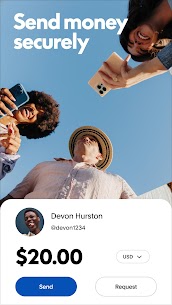
The PayPal app is a digital wallet that allows you to send and receive money, shop online, and manage your finances directly from your smartphone. It acts as a secure “middleman,” meaning you can pay for things without sharing your credit card or bank details with every store you visit.
🛠️ How to Set Up the App
Sign Up: Open the app and tap Sign Up. You’ll need to provide your mobile number, email address, and create a secure password.
Verify: PayPal will send a code to your phone via SMS. Enter it in the app to verify your identity.
Link a Payment Method: Go to the Wallet section to link a debit card, credit card, or bank account. This is how you will fund your payments.
📲 How to Use the Key Features
1. Sending Money
To pay a friend or a service provider:
Tap Send on the home screen.
Enter the recipient’s email, phone number, or username.
Enter the amount and select the Currency.
Important: Choose “Friends and Family” (usually free) or “Goods and Services” (which includes Buyer Protection for a small fee paid by the receiver).
Review and tap Send.
2. Requesting Money
If someone owes you money:
Tap Request.
Enter their contact info and the amount.
They will receive a notification and can pay you with one tap.
3. Shopping Online
When you see the PayPal button at checkout on a website:
Select PayPal as your payment method.
The app will often pop up or ask you to log in.
Confirm the payment—no need to type in your 16-digit card number.
4. Transferring Money to Your Bank
When you receive money, it stays in your PayPal Balance. To move it:
Tap on your balance or go to Wallet.
Tap Transfer Money -> Transfer to Bank.
Choose “Standard” (typically 1–3 business days, free) or “Instant” (usually takes minutes for a small fee).
🛡️ Key Benefits
Security: Your financial data is encrypted and never shared with the seller.
Buyer Protection: If an item you bought doesn’t arrive or isn’t as described, PayPal can help you get a full refund.
Global Reach: Send money to people in over 200 countries and 25 different currencies.
Related apps


Most rated apps
Most rated apps


